Skip to content PROJECT SHOWROOM / 06 RECIPES
Give your agent a real GPU project. Pick an outcome, copy one complete prompt, and paste it into your coding agent. It builds locally, asks before spending, and returns the artifact to your machine.
01 Copy a prompt model URL included 02 Approve the ceiling price + runtime 03 Get the artifact saved locally artifact / image-lab
PNG 512 × 512 returned ❯ PNG / 512 × 512 ✓ returned
Build 01
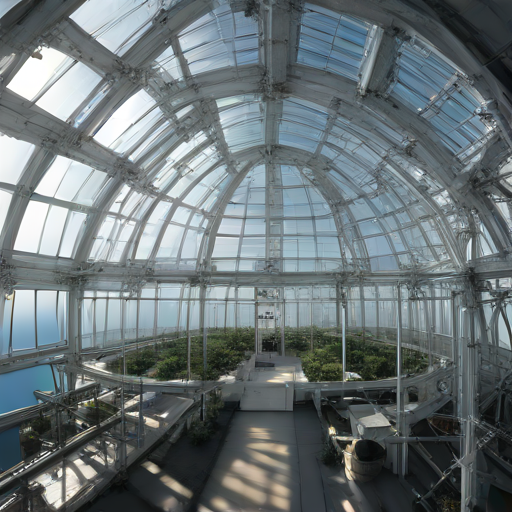
Turn a sentence into an image Build a tiny text-to-image app around the official Diffusers pipeline and generate a finished PNG.
Model: Hugging Face Diffusers ↗ You get A local 512px concept-art PNG
Copy the agent prompt → artifact / whisper-lab
▶
00:00 And so, my fellow Americans, ask not what your country can do for you, ask what you can do for your country.
❯ 00:00:00,000 → 00:00:10,380 ✓ returned
Build 02
Transcribe a piece of history Use OpenAI Whisper on its real JFK sample and bring back timestamped subtitles.
Model: OpenAI Whisper ↗ You get A local, timestamped SRT transcript
Copy the agent prompt → artifact / shape-lab
drag to rotate PLY · preview mesh
❯ PLY / binary preview
Build 03
Make a 3D object from words Run OpenAI's official Shap-E model and turn a text prompt into a mesh you can open locally.
Model: OpenAI Shap-E ↗ You get A local textured PLY mesh
Copy the agent prompt → artifact / protein-lab
drag to rotate mean pLDDT · 65.7
❯ PDB / ATOM records ✓ returned
Validate 04
Fold a protein in 3D Give ESMFold an amino-acid sequence and get an atomic structure without a sequence database.
Model: Hugging Face ESMFold ↗ You get A local PDB structure with confidence scores
Copy the agent prompt → artifact / segment-lab
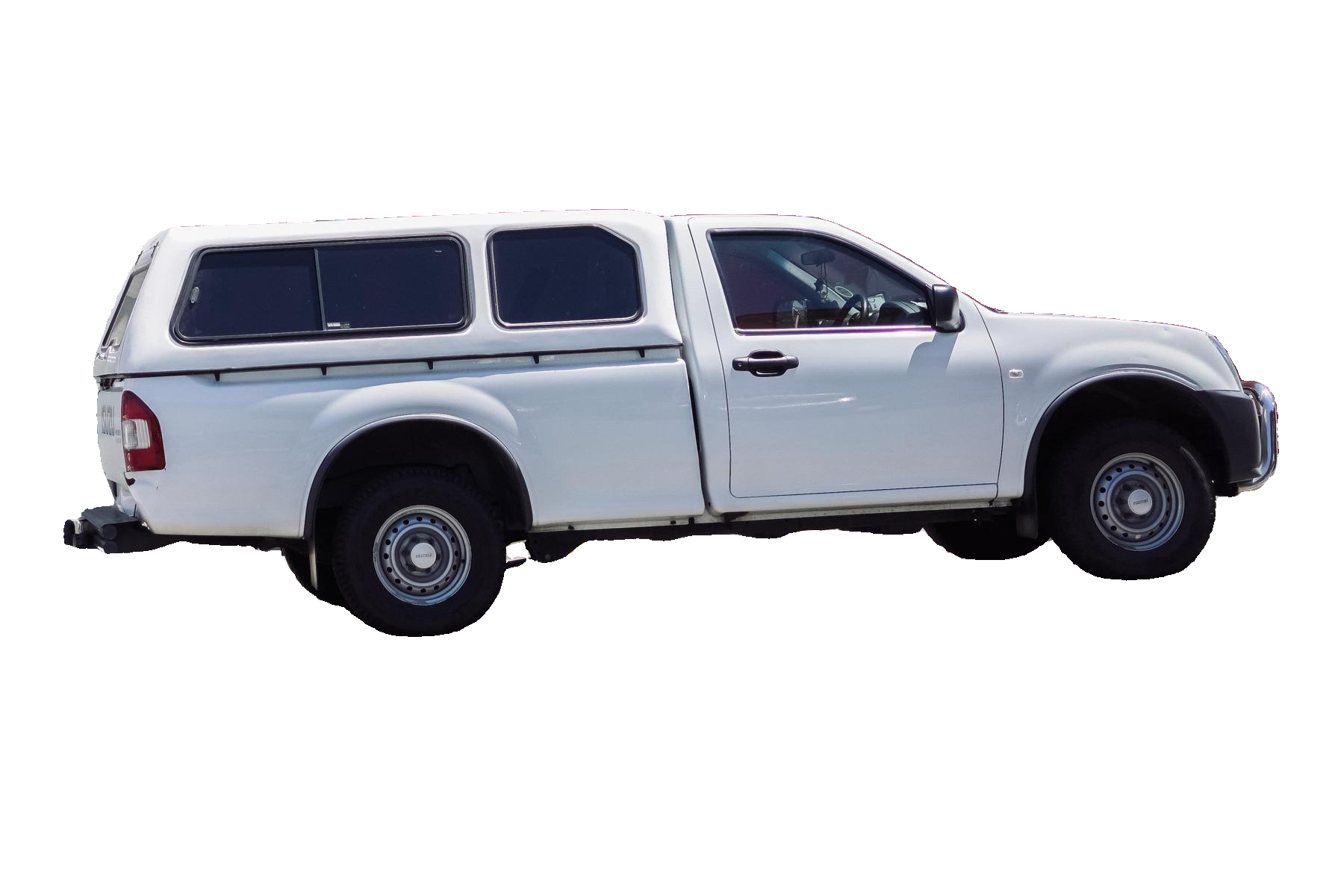
❯ RGBA / alpha ✓ returned
Build 05
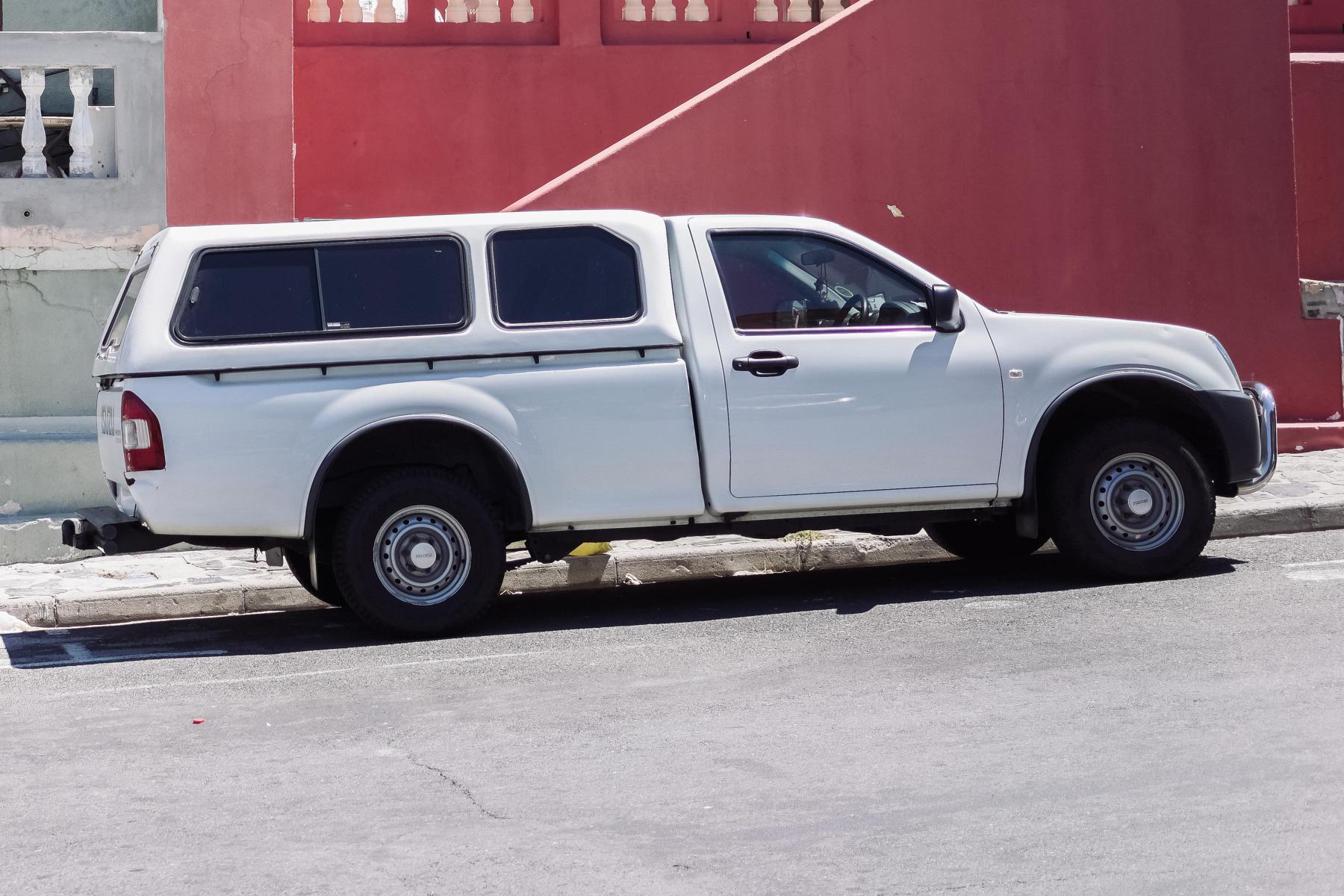
Cut an object out of a photo Use Meta's SAM 2 to find an object and return a transparent cutout with no manual tracing.
Model: Meta SAM 2 ↗ You get A local transparent PNG cutout
Copy the agent prompt → artifact / finetune-lab
training loss 1.652 → 1.551 before after
The sea is salty because of the oceanic water.
❯ Qwen3-0.6B + LoRA ✓ returned
Optimize 06
Teach a tiny language model Fine-tune a small Qwen model with LoRA and compare its answer before and after training.
Model: Hugging Face TRL ↗ You get A measured before-and-after fine-tune
Copy the agent prompt → YOUR TURN
Start with the result you want. The prompt handles the project scaffold, model source, compute bounds, and verification.
Choose a project ↑ Build / AGENT RECIPE
Turn a sentence into an image Paste this prompt into a coding agent from any empty working directory.
Use $amics to build a small text-to-image project.

### Project
- Model and usage: https://huggingface.co/stabilityai/sdxl-turbo
- Create image-lab with only pyproject.toml, README.md, and generate.py.
- Require Python 3.10+ with diffusers[torch], transformers, and accelerate.
- Pin torch==2.6.0 and source it from PyTorch's CUDA 12.4 wheel index (https://download.pytorch.org/whl/cu124) using an explicit uv index and source; then create uv.lock before acquisition.
- Use AutoPipelineForText2Image with stabilityai/sdxl-turbo in fp16, one inference step, guidance_scale=0.0, and a CUDA generator seeded with 42.
- Generate “a quiet orbital greenhouse above the Atlantic, technical editorial photography”.
- Write only the final PNG bytes to stdout; send diagnostics to stderr.

### Remote run
- Confirm that amics is installed and quote live capacity with at least 16 GB VRAM and a realistic runtime.
- Before spending, ask me to approve explicit hourly-price and runtime ceilings.
- After approval, run Amics from inside image-lab with one literal uv run python generate.py command in default output mode and redirect stdout locally to orbital-greenhouse.png.
- If streaming is interrupted, inspect it with amics runs get RUN_ID and reconnect with amics runs logs RUN_ID --follow; do not resubmit until it is terminal.
- Do not use --json, create durable storage, or replay an unknown run automatically.

### Success criteria
- Verify that the local output is a valid PNG and report its dimensions.
Copy prompt
Build / AGENT RECIPE
Transcribe a piece of history Paste this prompt into a coding agent from any empty working directory.
Use $amics to build a GPU transcription project.

### Project
- Model and usage: https://github.com/openai/whisper (load the turbo model)
- Create whisper-lab with pyproject.toml, README.md, and transcribe.py using the official openai-whisper package.
- Require Python 3.9+ with openai-whisper and torch.
- Pin torch==2.6.0 and source it from PyTorch's CUDA 12.4 wheel index (https://download.pytorch.org/whl/cu124) using an explicit uv index and source; then create uv.lock before acquisition.
- Download OpenAI Whisper's tests/jfk.flac into the folder before the snapshot; transcribe.py must read that local file rather than download it remotely.
- Run the turbo model on CUDA and emit a valid SRT transcript to stdout; send progress to stderr.

### Remote run
- Confirm that amics is installed and quote live capacity with at least 12 GB VRAM and a realistic runtime.
- Before acquisition, ask me to approve explicit hourly-price and runtime ceilings.
- After approval, run Amics from inside whisper-lab with one literal uv run python transcribe.py command in default output mode and redirect stdout locally to jfk.srt.
- If streaming is interrupted, inspect it with amics runs get RUN_ID and reconnect with amics runs logs RUN_ID --follow; do not resubmit until it is terminal.
- Do not use --json or durable storage, and never replay an unknown run automatically.

### Success criteria
- Verify that the SRT has numbered cues and timestamps, then show me the first two cues.
Copy prompt
Build / AGENT RECIPE
Make a 3D object from words Paste this prompt into a coding agent from any empty working directory.
Use $amics to build a text-to-3D project.

### Project
- Models and usage: https://github.com/openai/shap-e (load text300M and transmitter)
- Create shape-lab with only pyproject.toml, README.md, and generate_mesh.py, following OpenAI's official Shap-E text-to-3D example.
- Require Python 3.10+ and pin shap-e to the official commit 50131012ee11c9d2617f3886c10f000d3c7a3b43; include torch, pyyaml, and ipywidgets.
- Pin torch==2.6.0 and source it from PyTorch's CUDA 12.4 wheel index (https://download.pytorch.org/whl/cu124) using an explicit uv index and source; then create uv.lock before acquisition.
- Seed with torch.manual_seed(42), not a seed argument to sample_latents. Use batch_size=1, clip_denoised=True, use_fp16=True, use_karras=True, karras_steps=64, sigma_min=1e-3, sigma_max=160, and s_churn=0.
- Generate “a small lunar rover with six wheels”, decode it with tri_mesh(), and export a binary PLY.
- Gzip the final PLY bytes to stdout so the artifact remains recoverable; send all progress to stderr.

### Remote run
- Confirm that amics is installed and quote live capacity with at least 16 GB VRAM and a realistic runtime.
- Before spending, ask me to approve explicit hourly-price and runtime ceilings.
- After approval, run Amics from inside shape-lab with exactly one literal uv run python generate_mesh.py command in default output mode, redirect stdout to lunar-rover.ply.gz, then decompress it locally to lunar-rover.ply.
- If streaming is interrupted, inspect it with amics runs get RUN_ID and reconnect with amics runs logs RUN_ID --follow; do not resubmit until it is terminal.
- Do not use --json or durable storage, and never replay an unknown run automatically.

### Success criteria
- Validate the PLY header and report the local file size.
Copy prompt
Validate / AGENT RECIPE
Fold a protein in 3D Paste this prompt into a coding agent from any empty working directory.
Use $amics to build a protein-folding project.

### Project
- Model and usage: https://huggingface.co/facebook/esmfold_v1
- Create protein-lab with pyproject.toml, README.md, and fold.py using Hugging Face Transformers' exact EsmForProteinFolding class with facebook/esmfold_v1.
- Require Python 3.9+ with transformers, torch, and biotite.
- Pin torch==2.6.0 and source it from PyTorch's CUDA 12.4 wheel index (https://download.pytorch.org/whl/cu124) using an explicit uv index and source; then create uv.lock before acquisition.
- Use the short example sequence from the official ESM documentation, run inference on CUDA, and call the public model.infer_pdb(sequence) method.
- Compute mean pLDDT from the returned PDB's CA-atom confidence values; do not import private Transformers helpers.
- Write only the PDB text to stdout; send the mean pLDDT confidence to stderr.

### Remote run
- Confirm that amics is installed and quote live capacity with at least 24 GB VRAM and a realistic runtime.
- Before acquisition, ask me to approve explicit hourly-price and runtime ceilings.
- After approval, run Amics from inside protein-lab with one literal uv run python fold.py command in default output mode and redirect stdout locally to result.pdb.
- If streaming is interrupted, inspect it with amics runs get RUN_ID and reconnect with amics runs logs RUN_ID --follow; do not resubmit until it is terminal.
- Do not use --json or durable storage, and never replay an unknown run automatically.

### Success criteria
- Validate that the local file contains ATOM records and report the confidence score.
Copy prompt
Build / AGENT RECIPE
Cut an object out of a photo Paste this prompt into a coding agent from any empty working directory.
Use $amics to build an image-segmentation project.

### Project
- Model and usage: https://huggingface.co/facebook/sam2-hiera-large
- Create segment-lab with pyproject.toml, README.md, and segment.py, following Meta's official SAM 2 image-prediction example.
- Require Python 3.10+ and pin SAM 2 to Meta's official commit 2b90b9f5ceec907a1c18123530e92e794ad901a4; include torch, torchvision==0.21.0, pillow, numpy, opencv-python, and huggingface_hub.
- Pin torch==2.6.0 and source it from PyTorch's CUDA 12.4 wheel index (https://download.pytorch.org/whl/cu124) using an explicit uv index and source; then create uv.lock before acquisition.
- Source torchvision from the same CUDA 12.4 uv index. Provide uv dependency metadata for sam-2 version 1.0 with its official runtime requirements so uv can lock the Git dependency without building it locally.
- Download the repository's notebooks/images/truck.jpg locally before the snapshot; segment.py must read that local file rather than download it remotely.
- Load facebook/sam2-hiera-large with build_sam2_hf and SAM2ImagePredictor, use a center-point prompt on the nearest truck, and select the highest-scoring mask.
- Build RGBA with np.dstack([np.array(image), (mask * 255).astype(np.uint8)]); do not assign four-channel pixels into the three-channel RGB array.
- Write only the transparent PNG bytes to stdout; send diagnostics to stderr.

### Remote run
- Confirm that amics is installed and quote live capacity with at least 16 GB VRAM and a realistic runtime.
- Before spending, ask me to approve explicit hourly-price and runtime ceilings.
- After approval, run Amics from inside segment-lab with one literal uv run python segment.py command in default output mode and redirect stdout locally to truck-cutout.png.
- If streaming is interrupted, inspect it with amics runs get RUN_ID and reconnect with amics runs logs RUN_ID --follow; do not resubmit until it is terminal.
- Do not use --json or durable storage, and never replay an unknown run automatically.

### Success criteria
- Verify that the local PNG has an alpha channel.
Copy prompt
Optimize / AGENT RECIPE
Teach a tiny language model Paste this prompt into a coding agent from any empty working directory.
Use $amics to build a small language-model fine-tuning project.

### Project
- Model and usage: https://huggingface.co/Qwen/Qwen3-0.6B
- Dataset: https://huggingface.co/datasets/trl-lib/Capybara
- Create finetune-lab with pyproject.toml, README.md, and train.py, following Hugging Face TRL's official SFTTrainer and PEFT integration.
- Require Python 3.10+ with transformers, datasets, trl, peft, torch, and accelerate.
- Pin torch==2.6.0 and source it from PyTorch's CUDA 12.4 wheel index (https://download.pytorch.org/whl/cu124) using an explicit uv index and source; then create uv.lock before acquisition.
- Fine-tune Qwen/Qwen3-0.6B with LoRA on the first 500 examples of trl-lib/Capybara for 30 steps using seed 42, batch size 2, gradient accumulation 4, bf16, and learning rate 2e-4.
- Read losses with [{"step": log.get("step"), "loss": log["loss"]} for log in trainer.state.log_history if "loss" in log].
- In one run, print the same test prompt's response before and after training, plus initial loss, final loss, runtime, and peak VRAM.

### Remote run
- Confirm that amics is installed and quote live capacity with at least 16 GB VRAM and a realistic runtime.
- Before acquisition, ask me to approve explicit hourly-price and runtime ceilings.
- After approval, run Amics from inside finetune-lab with one literal uv run python train.py command and retain its normal text output.
- If streaming is interrupted, inspect it with amics runs get RUN_ID and reconnect with amics runs logs RUN_ID --follow; do not resubmit until it is terminal.
- Do not create durable storage unless you first quote it and I approve its ongoing cost. Never replay an unknown run automatically.

### Success criteria
- Report the before-and-after response, loss change, runtime, and peak VRAM.
Copy prompt